
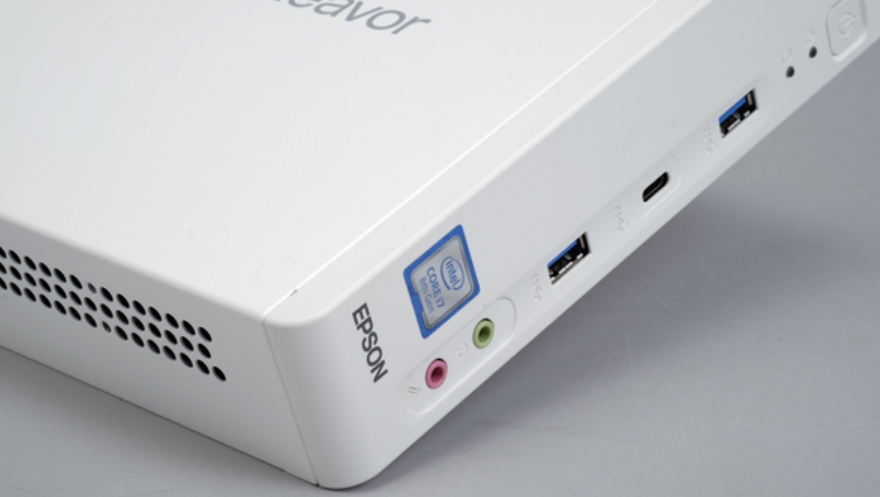
This Epson ST190E cost me 270 yuan second-hand. It has been squatting in my utility box for nearly two years. First it was a Synology replacement, then a carrier for fnOS, and for a while it was a node inside PVE. These past two days it changed again. Wiped clean, with a single Windows install on it.
Not to run more things. To give WorkBuddy and Harness, agents of that kind, a place that runs 7x24.
AI agents tore down my whole setup
When I set up fnOS, the requirement was clear. Store photos, take a remote look now and then, download a few movies, run a Docker container or two. All things a NAS can do.
This year it changed. I installed WorkBuddy on the desktops and laptops at home and on the laptop I carry around. Harness went onto my VPS boxes and inside fnOS. Even the phone has WorkBuddy and Dsh-go on it. At first it felt convenient, use whichever device is within reach. After a while the problem showed itself. Every device holds only part of my AI memory. Every plugin or Skill that took ages to get right only runs on the machine where it was built.
So All in One became a direction I had to consider.
What I actually wanted was a machine that stays on, can be woken from anywhere, can be reached from every device, and lets me fix something by saying one sentence into the phone. It also has to serve me and my family together. A benefit like this should not be something I keep to myself.
It sounds like an operations problem, but it puts the platform question in front of me first.
At first I wanted to virtualize macOS inside PVE. My reasoning was a natural assumption that macOS probably runs more efficiently than Windows. Half a day of research into GPU passthrough for macOS on PVE later, I found out that WorkBuddy does not support virtualized macOS at all.
So it looked like only Windows was left.
Android and Linux cannot meet the requirement either
Of course I did not skip other options. Android, for one.
The first idea was obvious. I have a pile of idle Android phones at home. On paper those Snapdragon, Dimensity and Kirin chips are low power and strong, and loading a small model onto the built-in GPU is no burden at all.
More importantly, if an AI agent could operate the apps on a phone, all those annoying ads and the daily grinding for membership perks would solve themselves.
A lovely idea. Reality disagrees.
Android’s sandbox locks every app in its own cage. For an agent to work across apps it has to go through accessibility services or automation frameworks, and those permissions can be pulled away at any time. Domestic ROMs will clear the background for you while they are at it.
dsh-go, the project that has pushed furthest in this direction, will very likely run into trouble again and again as systems and app permissions get updated.
That is not even the worst part.
The hardware is worse. Phones are designed for intermittent use. Screen, battery and thermals are all sized for a few hours.
To keep an Android device running an agent 7x24, you first have to solve continuous power, heat-driven throttling, battery savers killing the process, and a battery that swells after months at full charge.
None of that is fixed by installing an app. These are real engineering problems.
Step back and run Android in a virtual machine instead. Graphics, touch and sensors all have to be emulated, and the performance loss is not small. Real-time response is exactly what an agent needs most, and that is precisely where the loss lands.
Look one layer further out and the client form itself is changing. When harness launched it was pure web, open a browser and go. Now that entry point is hidden by default on the official site, and what gets pushed are the Windows and macOS desktop clients. This is not a product manager changing taste. Capability decides it. A web sandbox only does so much, and the deeper you go the closer you have to sit to the operating system.
Follow that trend and Linux, especially server Linux, will take an ever narrower place in the mainstream agent ecosystem, ending up as the choice of a few geeks. Linux is good at headless services. Agents want a headed desktop.
macOS is more direct. No official support for virtualized environments, and this machine cannot run it anyway. iOS does not even have a door.
That leaves Windows. Its advantage is not being advanced, it is being universal. The desktop is a real desktop. Graphics session, input method, file system, registry, all reachable. Screenshots, simulated clicks, file reads and writes need no extra authorization. The Windows ecosystem is large enough that almost every industry application, driver and client lands on Windows first, so an agent that learns one set of operations covers a huge area. It also reaches downward. MuMu and LDPlayer bring the Android half in, WSL or Hyper-V brings Linux and everything else in. It is close to a full-function platform.
One layer further out, phones, tablets, TVs and cloud hosts all end up dealing with a Windows machine. In remote desktop, SMB sharing, browsers and Office documents, Windows is always the middle link. Put the center here and every other device becomes a terminal. Shortest path.
Why Windows 10 IoT LTSC
I spent a fair amount of effort on the Windows version, and settled on Windows 10 IoT Enterprise LTSC 2021.
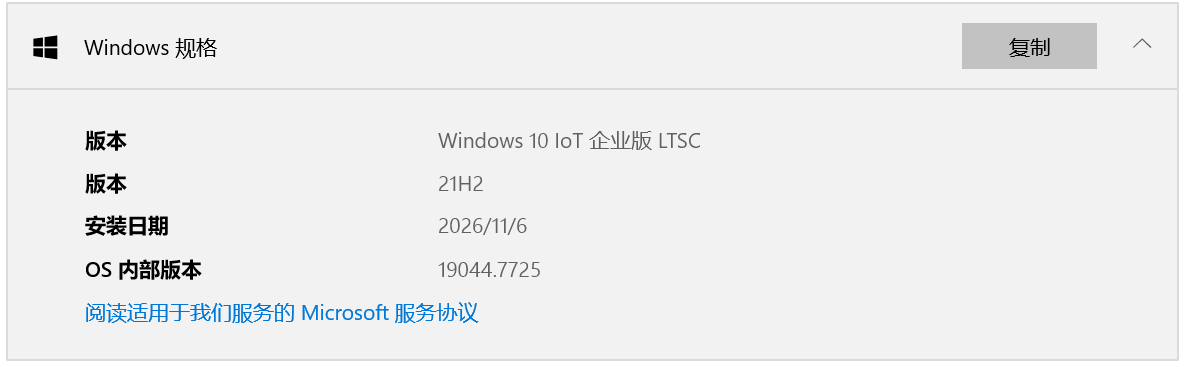
LTSC’s virtue is that it is lean and it lasts. No app store, no Cortana, no Copilot, no twice-yearly feature updates, only security patches for ten years. For a machine in a utility box with no monitor attached for long stretches, that matters more than any performance number.
A headless machine that has to stay up for years fears one thing above all, an update that hangs halfway, when you can neither pull the plug nor carry a monitor and keyboard down to the utility box.
Memory is cheaper too. After install it idles around 1.5G. The same machine on Win11 needs 4G or more just to sit there. For a 16G box running WeChat and an Android emulator at the same time, that 2.5G is roughly the difference between one emulator and two. And IoT support runs to 2032, long enough for this machine to retire.
The trouble was the image. There is no ready-made Chinese IoT LTSC image online. archive.org has one, English only. The third-party sites advertising “clean versions” I would not touch. You can never tell what is inside them.
So I took a roundabout route. Install the original Windows 10 Enterprise LTSC 2021 first, build 19044.1288, then convert it to IoT LTSC 2021 with an official key. Same kernel, a different licensing channel and support window.
That way I got both. A clean, controllable image, and the long IoT support.
What a Win NAS plus an agent can do
With the platform settled, the next step is networking. On Windows that means RDP first.
The house sits behind double NAT, an optical modem plus a router. RDP is not reachable from outside, and IPv6 is off as well, so the basic security side is covered. The channels available are plentiful, Tailscale, a self-hosted CF Tunnel relay, NetEase UU, Sunflower, any of them.
On the phone it is easy too. The Windows app handles it.
Then the functions. This machine does five things.
First, agents like WorkBuddy and Harness. Autostart plus never shutting down, and the phone app reaches them from anywhere, with no limit on the number of clients, so several devices can drive the agent at once. One caveat. WorkBuddy does not share files larger than 20MB remotely by default, so it is best to pair it with a third-party cloud drive that syncs whatever the agent produces.
Second, the photo library work a NAS should do. I bought MT Photos back when I was on fnOS, and I am keeping it. Configuring it on Windows is easier than on Linux, and since this is bare metal, there is no GPU passthrough to fiddle with at all. TrailSnap, LibrePhotos, even OneDrive would all work as well.
Third, tasks that need genuine operation. The advantage of Windows is that automation tools already see its environment as a normal human. A real home broadband IP, a browser fingerprint that reads as an ordinary person, none of the tricks Linux requires to imitate a real user. When an agent goes after a Cloudflare-protected page, it can usually handle it on its own. On Linux I used to have to think hard about anti-bot workarounds.
Fourth, file sharing. Barely a problem. Right-click a folder, share it, tick the user.
Fifth, media, web and download servers and so on. Not much difficulty there either.
And precisely because Windows offers so little difficulty, many people, me included, have looked at this approach as crude, too simple, without any technical elegance. We would rather fiddle with strange Linux setups than use it. But honestly, the great way is simple. Windows as a full-function platform is the most reliable and most practical answer for most people.
A line from Xin Qiji fits here. I searched for her through the crowd a thousand times, then turned, and there she was, where the lanterns were dimmest.