
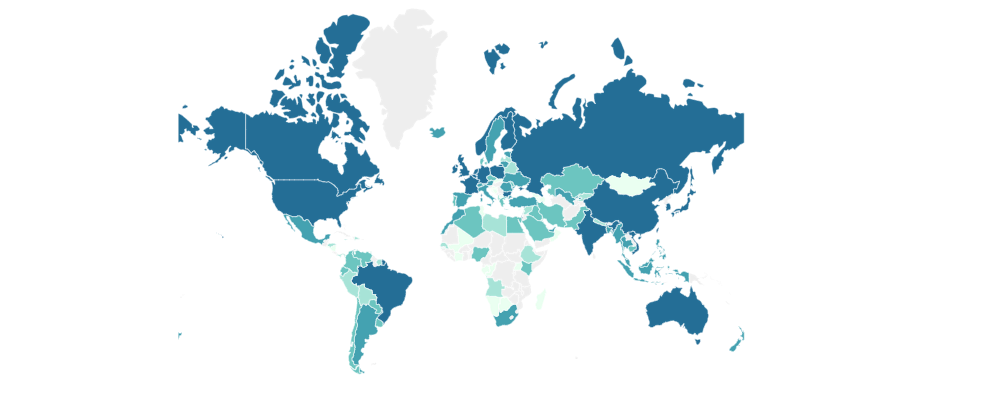
In recent years, I have installed the 1Panel control panel on almost all my VPS instances, mainly because it is simple and easy to use. However, since 1Panel launched its Professional Edition, features like website monitoring are no longer available in the free version.
Previously, I hosted my blog on Vercel or Cloudflare, using either the built-in usage statistics or self-hosted third-party applications like Umami. But recently, I encountered issues where vulnerabilities in Next.js, which Umami depends on, caused my VPS to run under high load. After switching to Vercel hosting, I found the connection speed unsatisfactory, so I ultimately decided to abandon Umami and use built-in services on the VPS for monitoring. I also moved my blog hosting to the VPS.
Building a Hugo blog on GitHub and syncing it to the VPS via Rsync is straightforward. I briefly wrote about it before: How to Deploy a Hugo Blog to a VPS , so I won’t elaborate further here.
Goaccess Installation Method
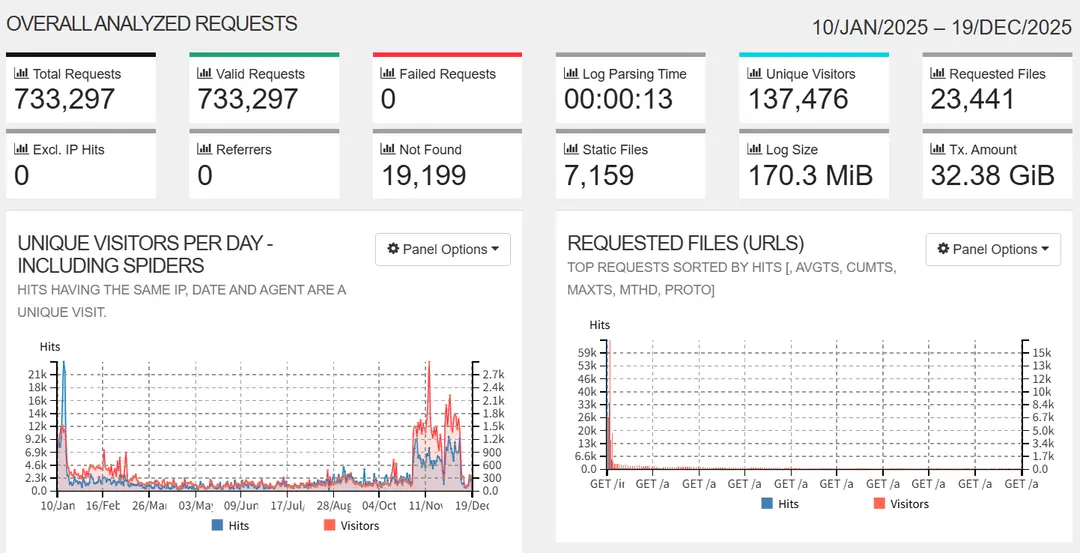
Goaccess is a tool for reading and automatically analyzing server logs. It is feature-rich and consumes minimal resources. For a simple installation, you can directly run apt install goaccess. However, the Goaccess version in the Debian repository I use is still 1.7.2. If you need to install a newer version, follow the official recommendations as shown below:
- Install Dependencies
Goaccess requires ncurses to run. Additionally, enabling the map feature requires downloading the geoip database and maxminddb.
sudo apt-get install -y pkg-config
sudo apt-get install -y libncursesw5-dev
sudo apt-get install -y libmaxminddb-dev
sudo mkdir -p /usr/local/share/GeoIP
sudo wget -O /usr/local/share/GeoIP/GeoLite2-City.mmdb https://raw.githubusercontent.com/P3TERX/GeoLite.mmdb/download/GeoLite2-City.mmdb- Install Goaccess
$ wget https://tar.goaccess.io/goaccess-1.9.4.tar.gz
$ tar -xzvf goaccess-1.9.4.tar.gz
$ cd goaccess-1.9.4/
$ ./configure --enable-utf8 --enable-geoip=mmdb
$ make
# make install- Time Format Configuration
During installation, I encountered a time format error: No time format was found on your conf file.
You need to specify the time format in /usr/local/etc/goaccess/goaccess.conf or directly use COMBINED.
log-format COMBINED # Around line 127- Functionality Test
After installation, test whether logs can be read and output correctly.
goaccess /var/log/nginx/access.log -o report.html --geoip-database=/usr/local/share/GeoIP/GeoLite2-City.mmdbUsing with 1Panel
In newer versions of 1Panel, website directories are typically located at /opt/1panel/www/sites/domain.com/index, while logs are in /opt/1panel/www/sites/domain.com/log. Usually, there are two files: access.log and error.log. Only access.log is needed here.
You can find the log path in 1Panel - Websites - Website Directory.
- Real-Time Page
Add a new static website in 1Panel, such as stats.domain.com, and configure the necessary domain, SSL, etc.
/usr/local/bin/goaccess /opt/1panel/www/sites/domain.com/log/access.log \
  --output=/opt/1panel/www/sites/stats.domain.com/index/index.html \
  --real-time-html \
  --daemonize
You can also set it up as a system service by modifying the /etc/systemd/system/goaccess-real-time.service file to ensure it starts on boot and runs more stably.
[Unit]
Description=GoAccess Real-Time Web Log Analyzer
After=network.target
[Service]
Type=simple
User=root
ExecStart=/usr/local/bin/goaccess /opt/1panel/www/sites/lawtee.com/log/access.log \
            --output=/opt/1panel/www/sites/realtime.lawtee.com/index/index.html \
            --real-time-html \
            --log-format='%h %^[%d:%t %^] "%r" %s %b "%R" "%u" "%v"' \
            --date-format=%d/%b/%Y \
            --time-format=%T \
            --geoip-database=/usr/local/share/GeoIP/GeoLite2-City.mmdb
Restart=always
RestartSec=3
[Install]
WantedBy=multi-user.target
Enable on boot:
sudo systemctl daemon-reload
sudo systemctl start goaccess-real-time
sudo systemctl enable goaccess-real-time - Scheduled Tasks
Since my VPS has limited performance, I don’t want to overburden it. Instead, I set up scheduled reports to be generated twice daily and output to a specified page. In practice, processing 400MB of logs takes only a few seconds on a 1C1G VPS, so there’s no need to worry about performance.
First, add a new static website in 1Panel, such as stats.domain.com, and configure the necessary domain, SSL, etc.
Then, create a scheduled task in 1Panel’s scheduled tasks section. Set the type to shell script, schedule it to run once or multiple times daily, and execute it as the root user. The script content is as follows:
/usr/local/bin/goaccess /opt/1panel/www/sites/domain.com/log/access.log \
  --output=/opt/1panel/www/sites/stats.domain.com/index/index.html \
  --log-format='%h %^[%d:%t %^] "%r" %s %b "%R" "%u" "%v"' \
  --date-format=%d/%b/%Y \
  --time-format=%T \
  --geoip-database=/usr/local/share/GeoIP/GeoLite2-City.mmdb
If you have multiple sites, you can add logs from several websites when creating the scheduled task and output the report links to a single page.